

Why Android Voice Agents Break After the Prototype Stage
Hitesh Sondhi · May 6, 2026 · 12 min read
We’ve seen this movie too many times.
On Friday, somebody says, “i built a voice agent for Android in a weekend.” By Monday, it’s dropping wake words in a noisy lobby, chewing through battery like a teenager through pizza, and taking so long to answer that users start talking over it. The demo was magic. Production was a bar fight.
That gap is the whole story.
A prototype voice agent is like singing in the shower — everything sounds pretty good when the room is forgiving. Shipping one on Android, on real devices, with real microphones, flaky networks, Bluetooth weirdness, OEM background limits, and users who mumble while walking past traffic? That’s Carnegie Hall with a broken monitor and a drunk sound engineer.
If you’ve ever thought, “i built a voice, so how hard can the rest be?” — this article is for you.
Key Takeaways
- Weekend demos hide the hard parts: latency, interruptions, battery, audio routing, and recovery logic.
- If your Android voice agent depends on a perfect network, it’s already in trouble.
- Turn-taking is harder than speech recognition. Users care more about timing than your benchmark chart.
- On-device components usually win for wake word, VAD, and interruption handling.
- The best architecture is boring, observable, and brutally honest about failure.
The Prototype Lie
Here’s the first trap: prototypes are built in quiet rooms by the same people who designed them.
Of course they work. You know the command phrasing, you speak clearly, your Wi‑Fi is stable, and you forgive every awkward pause because you’re emotionally invested. That’s not product validation. That’s a rehearsal with the band’s biggest fans.
We’ve built voice systems where the first polished demo looked fantastic, then completely fell apart once we tested with hotel staff, guests with different accents, cheap Android hardware, and the kind of lobby noise that sounds like someone blending cutlery. That’s when the real bugs showed up.
And they weren’t glamorous bugs.
They were things like audio focus getting stolen by another app, Bluetooth headsets reporting bizarre sample rates, text-to-speech continuing after the user started speaking, and the app process getting “helpfully” throttled by the OS. Android doesn’t care that your investor demo went well.
Hot take: most “voice AI demos” are just latency demos wearing a fake mustache.
What Actually Breaks First
The first thing to die usually isn’t ASR accuracy. It’s the conversation rhythm.
People will forgive a slightly wrong transcript. They won’t forgive a system that interrupts them, responds two seconds late, or keeps talking after they’ve already changed their mind. Human conversation is all timing, and Android voice agents often feel like they learned social skills from a fax machine.
Here’s the mental model we use: a voice agent isn’t one model. It’s a relay race with six runners who all drop the baton under pressure.
Here’s how that pipeline usually looks:
flowchart TD
  A[Mic Input] --> B[VAD / Wake Word]
  B --> C[ASR]
  C --> D[NLU or LLM]
  D --> E[TTS]
  E --> F[Speaker Output]
  B --> G[Interruption Handler]
  G --> E
Looks neat in a diagram.
In production, every arrow is a place where your app can become annoying.
Latency Is the Product, Not a Metric
A lot of teams obsess over model quality and treat latency like a tuning exercise for later. That’s backwards.
For voice agents, latency is the product. If the user finishes speaking and your app waits around like it’s searching for its car keys, the interaction feels broken even if the final answer is brilliant.
Google’s Android guidance around audio apps and foreground services makes one thing painfully clear: mobile audio is a resource-constrained, interruption-heavy environment, not a cozy server room Android Developers, Android Foreground Services. And if you stream everything to the cloud, network variability becomes part of your personality.
That’s usually a bad personality.
In our experience, the winning setup for Android is hybrid: on-device for wake word, VAD, barge-in detection, and sometimes lightweight intent routing; server-side for heavier reasoning when it’s actually needed. We’ve taken that approach in voice-heavy systems because waiting on the network for every tiny conversational turn is a mistake you only make once.
If you’re exploring on-device AI or voice AI, this is the fork in the road that matters most.
Here’s the architecture we usually trust more than the “send everything to the cloud and pray” version:
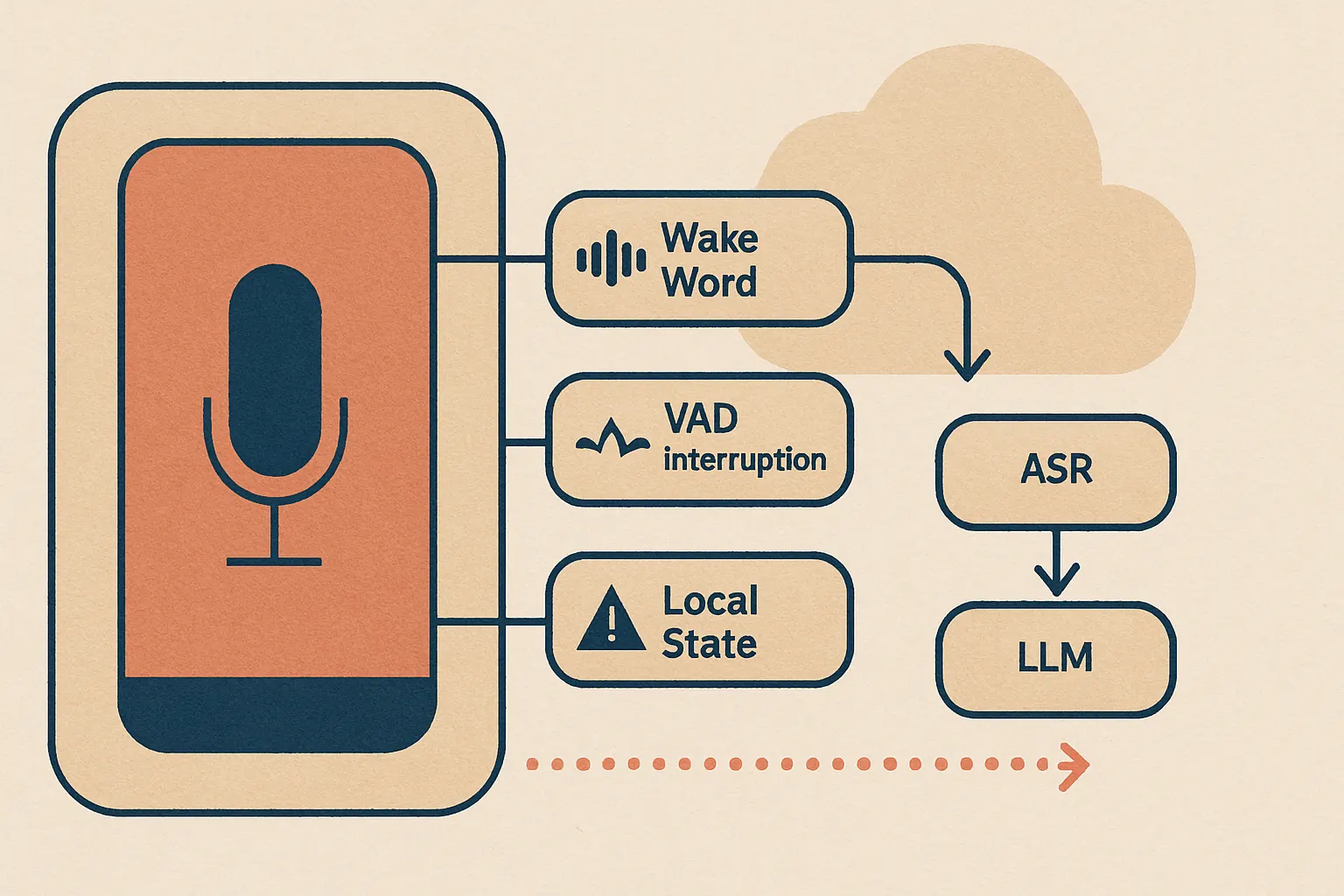
The real surprise came when we tested it.
Users didn’t praise the model. They praised that it “felt fast” and “didn’t talk over me.” That’s the stuff they notice.
Android Is Not a Neutral Host
If you’ve mostly built web apps, Android can feel personal. It has opinions. Strong ones.
Different OEMs handle battery optimization differently. Background execution rules change. Microphone behavior isn’t perfectly consistent across devices. Audio routing through speaker, wired headset, Bluetooth SCO, and Bluetooth A2DP can turn into a weird little opera of edge cases. The official Android docs on audio focus and routing exist for a reason, and that reason is pain Android Audio Focus, Android Audio Routing.
We’ve seen teams build a lovely proof of concept on a Pixel and then discover it behaves like a haunted toaster on a low-cost Samsung or Xiaomi device.
That’s not bad luck. That’s the job.
If your team says “works on my phone,” they’re not done. They’ve barely started.
Why “i built a voice” Isn’t the Same as Building a Voice Agent
This is where a lot of the SERP noise confuses people.
There’s a huge difference between cloning a voice, generating speech, and building an Android voice agent that can hold up under real usage. ElevenLabs, Google, Canva, Voiceflow — these tools are useful in different parts of the stack, and some are genuinely good at what they do. ElevenLabs, for example, offers voice generation and agent tooling with broad language coverage ElevenLabs. Google AI Studio also supports text-to-speech workflows through Gemini-related tooling Google AI Studio.
But if your story is “i built a voice,” you might have built a voice asset, not a product.
That’s like saying you built a restaurant because you bought a very nice oven.
A production voice agent needs turn-taking, memory boundaries, interruption logic, fallback prompts, device-aware audio handling, observability, and cost control. The synthesized voice is one piece. An important piece, sure. But still one piece.
We’ve worked with clients who came in with a cloned voice and a rough agent prompt, convinced they were 80% done. They were closer to 25%.
Maybe 15% on a bad day.
If you need the full stack — agent behavior, mobile integration, deployment, and model decisions — this is usually where AI agents, custom models, and AI consulting stop being nice-to-haves and start being the actual work.
The Three Problems Nobody Budgets For
1. Barge-in and interruption handling
Users interrupt. Constantly.
They correct themselves, change intent mid-sentence, start speaking while TTS is still playing, or abandon the request halfway through. If your app can’t detect that and cut audio output fast, it feels rude. Worse, it feels dumb.
This is why local VAD and interruption detection matter so much. Waiting for a round trip to the cloud before deciding whether the user is speaking again is like asking a referee in another country whether you should stop punching.
2. State management
Voice agents need memory, but not too much memory.
A lot of weekend prototypes keep shoving the entire conversation back into the prompt until context windows get bloated, costs rise, and the model starts acting like a person who’s had too much coffee and not enough sleep. We prefer explicit state: what the user is trying to do, what slot values we’ve captured, what confirmations are pending, and what can be safely forgotten.
Fine-tuning conversation state is like seasoning food — too little and it’s bland, too much and you’ve ruined dinner.
3. Cost drift
Nobody wants to talk about this because demos are cheap.
Production isn’t. If every utterance goes through cloud ASR, a large reasoning model, and premium TTS, your margin starts leaking from three holes at once. We’ve found that cost discipline early changes architecture decisions for the better, especially when you route simple requests to smaller models or local handlers.
If you want a rough sense of where the money goes, use an AI cost estimator before you promise anything heroic to your boss or client.
Why Your Testing Is Probably Way Too Clean
Most teams test voice agents like they test forms: controlled inputs, expected outputs, done.
That’s adorable.
Real voice testing needs noise, accents, interruptions, packet loss, device variation, and user impatience. NIST has long published evaluation work around speech and speaker technologies because audio systems behave very differently under realistic conditions NIST Speech and Speaker Recognition Evaluations. The lesson is simple: clean-lab performance doesn’t map neatly to messy reality.
We like test matrices that include:
- noisy café audio
- lobby or street background noise
- Bluetooth headset transitions
- low battery mode
- weak network and packet jitter
- users who don’t wait for prompts
- users who say “uh, no, wait, actually…”
Because they will.
At Cropsly, our work on RunHotel pushed this lesson hard. Hospitality environments are chaos in a blazer. If your voice system only works when one person speaks clearly in a quiet room, you don’t have a hospitality product. You have a lab experiment.
But that’s only half the problem.
Observability: If You Can’t See It, You Can’t Fix It
A shocking number of voice apps have worse telemetry than a side project weather widget.
You need timestamps across every stage: wake detection, speech start, speech end, ASR finalization, LLM first token, TTS start, playback stop, interruption events, retries, and fallbacks. Without that, all debugging becomes superstition. “It feels slow sometimes” is not an engineering signal.
We prefer tracing each conversational turn as a timeline. Once you do that, ugly truths jump out: VAD thresholds are too conservative, TTS startup dominates response time, or one particular Android device family is wrecking your p95.
This is where teams either become adults or keep guessing.
The Stack We’d Choose Today
If we were building an Android voice agent beyond prototype stage right now, we’d usually start with a hybrid setup:
- On-device wake word and VAD
- Local interruption detection and audio state machine
- Streaming ASR when network is available
- Smaller routing model first, larger model only when needed
- TTS selected for startup speed and intelligibility, not just “wow, that sounds human”
- Structured conversation state outside the prompt
- Full turn-level tracing and cost tracking
That’s not the flashiest stack.
It’s the one that survives contact with users.
And yes, there are cases where fully on-device is the right answer, especially for privacy, offline resilience, or predictable latency. We’ve spent enough time with on-device AI to say this plainly: smaller local models that answer quickly often beat larger remote models that answer beautifully but too late.
Fast and good-enough is underrated.
If You’re Still in the “i built a voice” Phase
Good. That’s a real start.
Just don’t confuse a voice clone, a TTS demo, or a prompt-wrapped chatbot with a production Android voice agent. When people search “i built a voice,” they’re often looking at cloning, generation, or creator tools. Useful stuff, absolutely. But if your goal is an app that lives on a phone and survives actual users, you need to think like a systems engineer, not just a prompt engineer.
That means handling the ugly bits:
- audio focus
- app lifecycle
- network fallback
- battery
- interruptions
- telemetry
- cost ceilings
- device fragmentation
None of this is glamorous. All of it matters.
If you’re planning to build or rescue an Android voice product, we can help with voice AI, AI agents, custom models, or the broader architecture through AI consulting. Or just contact us before your weekend prototype becomes next quarter’s incident report.
FAQ
Why do Android voice agents work in demos but fail in production?
Because demos remove the messy parts. Production adds noisy environments, device fragmentation, network instability, battery constraints, and users who interrupt constantly.
Should voice agents run fully on-device or in the cloud?
Usually both. On-device is best for wake word, VAD, interruption handling, and privacy-sensitive low-latency pieces; cloud is useful for heavier ASR or reasoning when needed.
Is cloning a voice the same as building a voice agent?
No. Cloning a voice gives you a voice asset, not the full conversational system. A real agent also needs turn-taking, state management, fallback logic, observability, and mobile integration.
What’s the biggest technical mistake teams make first?
They ignore latency and turn-taking. A slightly less accurate system that responds quickly and stops when interrupted usually feels better than a smarter system that’s slow and socially clueless.
How do you estimate the cost of a production voice agent?
Break it into ASR, model inference, TTS, and infrastructure per turn, then model usage by session length and concurrency. If you want a practical starting point, try our AI cost estimator.
What To Do Next
Take your prototype and run one ugly test week.
Use three Android device classes. Add café noise. Force weak network conditions. Measure every stage of a turn. Then cut one cloud dependency and see if the experience gets better. It usually does.
That’s how you stop saying “i built a voice” and start saying you built a product.
And trust us — the second sentence is a lot harder to earn.