
Why Your AI Agent Breaks Without Model Context Protocol
Hitesh Sondhi · April 26, 2026 · 12 min read
We’ve seen this movie before: the demo was perfect on Thursday, the pilot looked “promising” on Friday, and by Monday the agent was confidently inventing customer records because one tool returned a field called customer_id and another returned id. Same user. Same intent. Different schemas. Total mess.
That’s the dirty secret of a lot of “AI agents” right now. They don’t fail because the model is dumb. They fail because the plumbing is chaos.
And that’s exactly why people keep talking about model context protocol.
Key Takeaways
- Model Context Protocol (MCP) is a standard way for models and agents to discover and use tools, data sources, and context without bespoke glue code for every integration.
- If your agent touches more than one system, model context protocol goes from “nice idea” to “please save us from ourselves.”
- MCP won’t magically fix bad prompts, bad permissions, or bad product thinking. It just removes one giant class of integration pain.
- For simple single-purpose bots, MCP can be overkill. Hot take: a lot of teams should ship a boring direct API integration first.
- If you’re building serious agents for operations, support, sales, or voice workflows, you should at least evaluate MCP before writing your fifth custom adapter.
So what is Model Context Protocol, really?
Here’s the plain-English version: Model Context Protocol is a standard for giving AI models structured access to external context and tools.
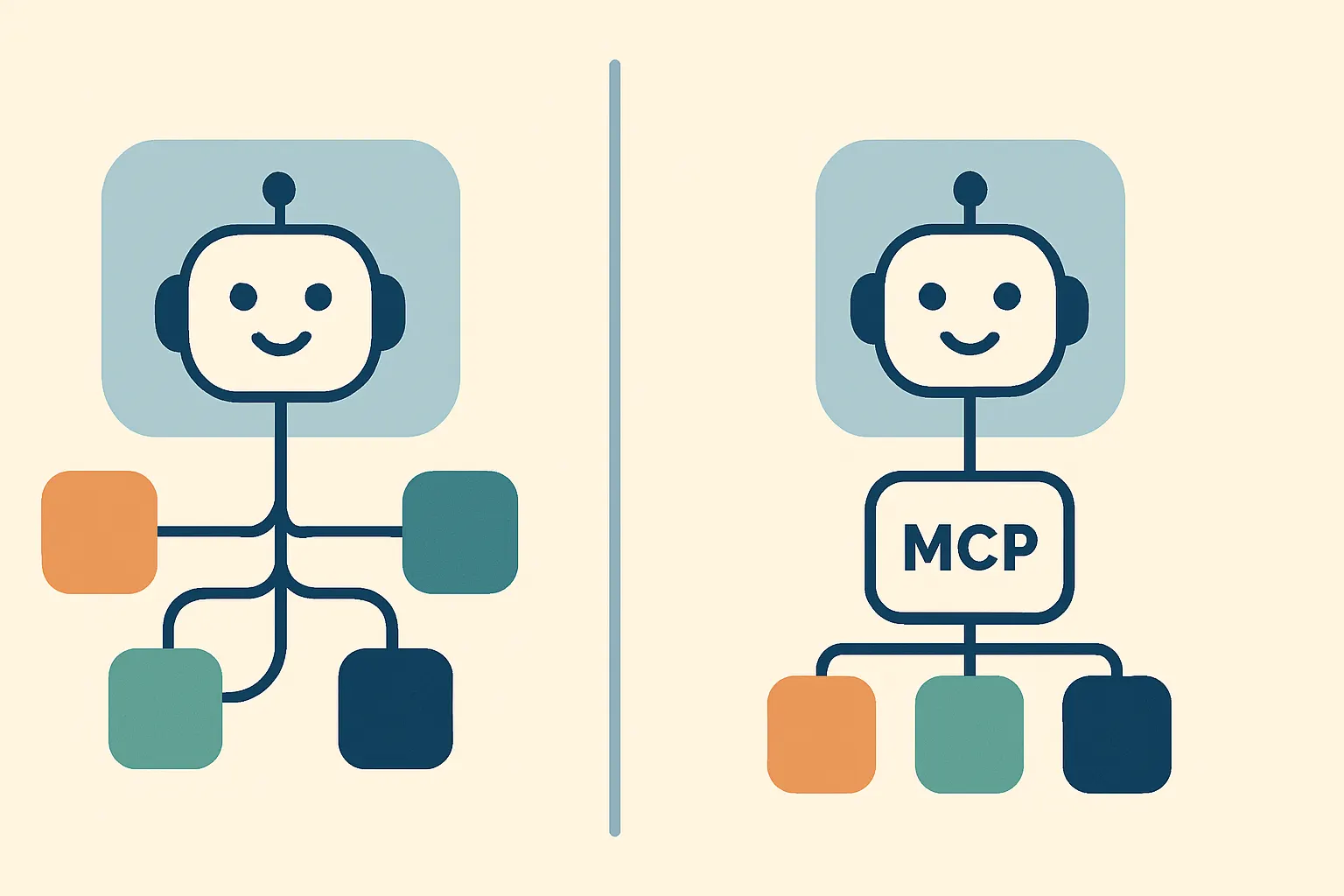
Think of it like USB-C for agent integrations. Before USB-C, every device came with its own cursed cable drawer. MCP is trying to stop us from building the AI equivalent of that drawer.
Instead of hard-wiring every model to every database, CRM, docs system, file store, or internal API with custom code, MCP defines a common way for a client and a server to expose capabilities and exchange context. The model doesn’t need to guess what tools exist or what shape the inputs should be. It can inspect what’s available and use it in a more predictable way.
That’s the theory, anyway.
The reason people care is simple: agents are no longer just chat boxes. They read docs, call APIs, update tickets, query product catalogs, summarize meetings, and trigger workflows. Once you cross that line, ad hoc integration code starts breeding like rabbits.
And rabbits are cute. Legacy integration layers aren’t.
Why your agent breaks without it
Most agent failures look like “LLM problem” from the outside. Hallucination. Wrong tool use. Forgotten context. Randomly brittle behavior.
A lot of the time, it’s actually integration entropy.
We’ve found that once an agent has to work across multiple systems, the real failure modes are painfully boring:
- Tool descriptions drift from reality
- API versions change silently
- Auth rules differ across systems
- Data formats don’t line up
- Context gets stuffed into prompts like a teenager shoving clothes into a suitcase
That last one is especially bad.
Without a standard interface, teams often solve context by dumping giant blobs into the prompt: docs, tool specs, examples, user state, business rules, and half the company wiki. It works until latency spikes, token costs climb, and the model starts missing the one line that mattered.
It’s like briefing a paramedic by throwing an entire filing cabinet into the ambulance.
Here’s how the basic MCP-style setup differs from the usual spaghetti:
flowchart LR
  U[User Request] --> A[Agent Client]
  A --> M[LLM]
  A --> S[MCP Server]
  S --> T1[Tool: CRM]
  S --> T2[Tool: Docs]
  S --> T3[Tool: Tickets]
  M --> A
The point isn’t that MCP makes the model smarter. It makes the environment around the model less stupid.
That matters more than people want to admit.
What MCP actually standardizes
At a practical level, MCP helps standardize how an AI application can:
- Discover available tools and resources
- Understand input/output schemas
- Request context from external systems
- Invoke actions in a structured way
- Keep the integration layer more portable across models and clients
If you’ve ever built a custom agent stack, you already know why this is appealing. Every new tool usually means another wrapper, another parser, another permission edge case, another place where JSON goes to die.
We’ve built enough production systems to say this plainly: custom tool glue code is one of the fastest ways to create a future maintenance nightmare. If you’re doing serious work in AI agents, standards are not boring. Standards are how you sleep at night.
The part people oversell
Here’s the hot take: model context protocol is useful, but it’s already being treated like a silver bullet by people who haven’t shipped enough broken agents yet.
MCP doesn’t solve:
- Bad tool design
- Bad retrieval quality
- Bad access control
- Bad orchestration logic
- Bad product scope
If your agent is allowed to call ten tools with vague descriptions and overlapping responsibilities, MCP won’t save you. It’ll just give you a cleaner way to watch the agent make bad choices.
We tried a version of this pattern early in one workflow-heavy assistant: too many tools, too much overlap, not enough opinionated routing. The result wasn’t “flexibility.” It was analysis paralysis with API calls.
The protocol was not the problem.
Our architecture was.
When MCP is absolutely worth it
If your agent needs to interact with multiple external systems, especially across teams or customers, MCP starts looking very sensible.
It’s especially useful when you have:
1. A growing tool ecosystem
Today it’s a ticketing API and a docs index. Next month it’s billing, CRM, analytics, inventory, and some ancient internal service that only one engineer understands and everyone fears.
That’s when standards start paying rent.
2. More than one model or client
Maybe you’re testing Qwen3 for one workload and a hosted model for another. Maybe you’ve got a web app, an internal ops console, and a voice interface. A shared protocol helps avoid rebuilding the same integration logic three times with three different wrappers.
We see this a lot in voice-heavy systems. If you’re doing voice AI, context has to be fetched fast, structured cleanly, and passed into the right turn of the conversation without turning your latency budget into confetti.
3. Regulated or permission-sensitive workflows
Once your agent touches customer data, internal systems, or operational actions, “just let the model figure it out” becomes a career-limiting strategy.
MCP can help by making tool boundaries and contracts clearer. Not perfect. Just clearer.
4. Teams that don’t want vendor lock-in everywhere
This is one of the more practical reasons. If your whole integration layer is custom-built around one framework’s tool abstraction, migrating later is like trying to move house by carrying the foundation with you.
That’s a bad weekend.
When MCP is probably overkill
Let’s be honest: not every agent needs this.
If you have a narrow bot with one or two stable tools, a direct integration can be simpler, faster, and easier to debug. We’d rather see a team ship a focused assistant with clean contracts than spend six weeks “future-proofing” a prototype that nobody uses.
This happens constantly.
A founder says they need an “agent platform.” What they actually need is one API call, one retrieval step, and a hardcoded approval gate. If that’s you, save the architecture astronautics for later and go validate the workflow first. If you need help making that call, that’s exactly the kind of thing we do in AI consulting.
Boring works.
Why this matters even more for on-device and voice systems
This is where things get interesting.
In cloud-only chat apps, you can hide a lot of sins with more tokens, more retries, and more infrastructure. In on-device or low-latency systems, you don’t get that luxury. Every extra round trip hurts. Every bloated context packet matters.
For teams building on-device AI, structured context exchange is a practical concern, not an academic one. If you’re running a smaller model locally, you can’t afford to feed it a junk drawer of semi-relevant state and hope for the best.
The same goes for real-time voice. Our work on products like RunHotel made one thing painfully obvious: voice systems punish ambiguity. If the assistant has to figure out tool semantics mid-conversation while a guest is waiting, you’ve already lost the moment.
Here’s a simple way to think about it:
Fine-tuning a model is like seasoning food. Context orchestration is the kitchen. You can have amazing spices, but if the kitchen is on fire, dinner’s still ruined.
What a sane adoption path looks like
If you’re considering model context protocol, don’t start by rebuilding your whole stack around it. That’s how architecture projects become expensive hobbies.
Start with one workflow that already hurts.
Pick something like:
- support agent + knowledge base + ticketing system
- sales assistant + CRM + product docs
- internal ops agent + dashboards + incident tools
Then ask a few blunt questions:
Do we have repeated integration pain?
If every new tool takes too long to wire up, document, and debug, that’s a signal.
Are we supporting multiple surfaces?
Web, Slack, voice, mobile, internal dashboards — all of that increases the value of a shared protocol layer. If you’re also working with custom models, this matters even more because model behavior varies, but clean tool contracts reduce the blast radius.
Are we expecting this system to grow?
A one-tool bot doesn’t need cathedral architecture. A cross-functional agent platform probably does.
Can we define strict permissions and schemas?
This is non-negotiable. MCP gives structure, but you still need governance. If your tool descriptions are vague and your action boundaries are sloppy, you’re just standardizing confusion.
The implementation trap nobody talks about enough
The biggest mistake isn’t adopting MCP too early.
It’s adopting it lazily.
We’ve seen teams expose a pile of tools through a protocol layer and call it “agent-ready.” But if the tools are poorly described, have inconsistent schemas, or return giant noisy payloads, the model still struggles. You’ve cleaned the pipes a bit, but the water’s still dirty.
Good MCP implementations are opinionated.
That means:
- tool names that say exactly what they do
- input schemas that don’t require psychic powers
- outputs trimmed to what the model actually needs
- permissions that map to real user roles
- fallback behavior when a tool fails or returns junk
If you skip that work, the protocol becomes a nice-looking wrapper around chaos.
And chaos wrapped in JSON is still chaos.
Should your AI agent use Model Context Protocol?
Usually, yes — if the agent is going to be real.
Not “conference demo” real. Not “our CEO tried it once” real. We mean production, multi-tool, multi-surface, maintained-by-a-team real.
If your agent needs to discover tools dynamically, connect to several systems, or stay portable across models and interfaces, model context protocol is worth serious consideration. It gives you a cleaner contract between the model and the systems around it, which is exactly where a lot of agents quietly fail.
If your use case is tiny, stable, and narrow, skip the ceremony for now. Build the simplest thing that works, measure where it breaks, then add standards when the pain is real.
That’s not anti-architecture.
That’s just how adults build software.
A practical checklist before you commit
Before you decide, run through this:
- Does the agent use 3+ tools or data sources?
- Do you expect those tools to change over time?
- Are you supporting more than one interface or model?
- Do you need tighter control over context and permissions?
- Is custom integration work already slowing the team down?
If you answered yes to most of those, MCP is probably not hype for you. It’s infrastructure.
If you answered no, don’t force it. Spend your energy on evaluation, routing, and user experience first. You can even estimate the operational tradeoffs before building with something like our AI cost estimator.
Because the real enemy usually isn’t lack of standards.
It’s building too much too soon.
FAQ
What is Model Context Protocol in simple terms?
It’s a standard way for AI applications to connect models with tools, data, and external context. Instead of custom integrations for everything, you get a more consistent contract for discovery and tool use.
Is model context protocol only useful for large enterprises?
No. It’s useful anywhere integration complexity starts compounding. Small teams feel this pain too, especially when one agent grows into several workflows faster than expected.
Does MCP replace RAG?
No. RAG and MCP solve different problems. RAG helps fetch relevant information; MCP helps standardize how tools and context sources are exposed and used.
Will MCP reduce hallucinations?
Sometimes indirectly, yes. Better structured tool access and cleaner context can reduce certain failure modes, but it won’t fix weak retrieval, bad prompts, or poor system design.
Should we use MCP for a voice AI assistant?
Often yes, especially if the assistant needs fast, structured access to bookings, CRM data, FAQs, or operational tools. Voice workflows have less tolerance for messy context and slow tool orchestration.
What we’d do next
If you’re building an agent that already talks to multiple systems, audit your integration layer before tweaking prompts for the tenth time. You might not have a model problem. You might have a protocol problem.
If you want a second opinion on the architecture, or you’re deciding between direct integrations and an MCP-based approach, talk to us through /contact. We’ll tell you if MCP makes sense — and if it doesn’t, we’ll say that too.
Because sometimes the smartest AI decision is admitting your “agent platform” is just three brittle functions in a trench coat.
Sources
- Anthropic, “Model Context Protocol” — https://www.anthropic.com/news/model-context-protocol
- Model Context Protocol Documentation — https://modelcontextprotocol.io/