

We Shipped an Agent MVP on Friday. By Monday, It Was Making Things Up.
Hitesh Sondhi · April 13, 2026 · 11 min read
That’s not a metaphor.
We had an agent that looked fantastic in demos. It could read docs, call tools, summarize results, and politely answer questions like a model citizen. Then real users showed up, typed messy requests, hit edge cases we hadn’t imagined, and the thing started behaving like an intern with too much confidence and not enough supervision.
That’s the dirty secret of ai agent development: the hard part isn’t getting the demo to work. It’s getting the MVP to survive production without burning money, inventing facts, or spamming your ops team at 2 a.m.
If you’re building your first agent MVP, you don’t need a bigger prompt. You need better constraints.
Key Takeaways
- Start with one job, one user, and one measurable outcome. Broad agents are usually bad agents.
- Tool use beats clever prompting when the task needs real-world actions or fresh data.
- Most production failures come from orchestration, bad retrieval, and missing guardrails — not model intelligence.
- Latency and cost will punch you in the face faster than model quality if you ignore them early.
- The best MVP in ai agent development is boring, narrow, observable, and hard to break.
Stop Building “General Agents.” They’re Mostly a Trap.
Here’s our hot take: “general-purpose business agents” are overrated.
They sound great in pitch decks. In production, they’re usually a fuzzy blob of prompts, tools, and wishful thinking. If your agent is supposed to do ten things for five teams across three systems, it won’t do any of them reliably enough to matter.
An MVP needs a sharp edge.
Pick one workflow where a human already follows a repeatable pattern: triaging support tickets, qualifying leads, extracting invoice fields, answering hotel guest questions, or routing internal requests. If you can’t describe the job in one sentence, your scope is too big.
Fine-tuning scope is like seasoning food. Too little and it’s bland. Too much and you’ve ruined dinner.
When we build production systems, we start with a painfully specific target: one user type, one trigger, one output, one success metric. That’s the difference between “an AI copilot for operations” and “an agent that classifies inbound vendor emails and drafts ERP-ready entries with human approval.”
One of those ships.
The other becomes a slide.
What an AI Agent MVP Actually Needs
A lot of teams hear “agent” and immediately picture a multi-step autonomous system with memory, planning, retrieval, tool use, fallback logic, and maybe a little existential dread.
You don’t need all that on day one.
A production-worthy MVP usually needs just five parts:
A clear trigger
Something starts the workflow: a form submission, chat message, email, API call, or voice request.A model with a narrow job
Not “reason about everything.” More like classify, extract, decide, draft, or route.One or two tools
CRM lookup, knowledge base search, calendar access, ticket creation, or database read/write.Guardrails
Schema validation, permission checks, confidence thresholds, and human review for risky actions.Observability
Logs, traces, prompt versions, tool-call history, latency, token cost, and failure reasons.
That’s enough to make something useful.
Here’s how the minimal production flow usually looks:
flowchart TD
  A[User Request] --> B[Intent + Validation]
  B --> C[Retrieve Context]
  C --> D[LLM Decision]
  D --> E[Tool Call or Draft Response]
  E --> F[Guardrails Check]
  F --> G[Human Review or Auto-Complete]
  G --> H[Logs Metrics Feedback]
Simple beats clever.
Especially in MVPs.
Why Your Agent Breaks the Moment Real Users Touch It
Demos are clean. Production is a food fight.
Users paste half a sentence, attach the wrong file, ask two things at once, contradict themselves, and expect the agent to somehow infer company policy from a three-month-old Notion page nobody updated. Then the model gets blamed for “hallucinating” when the real problem was garbage context and zero controls.
We’ve found that most broken MVPs fail in four places.
1. Retrieval is lying to you
RAG is useful. It’s also wildly overtrusted.
If your retrieval pipeline pulls the wrong chunk, stale content, or five near-duplicates with conflicting instructions, the model will confidently synthesize nonsense. That’s not intelligence. That’s a very expensive autocomplete machine doing its best with bad notes.
According to Microsoft’s advanced RAG guidance, chunking strategy, metadata, update cadence, and query preprocessing all materially affect retrieval quality. We agree, and we’d add one more opinion: if you haven’t manually inspected failed retrievals, your RAG stack is probably worse than you think.
This is where it gets weird.
Teams obsess over model choice — GPT, Claude, Qwen, Phi — while their retrieval layer is serving junk like a waiter bringing the wrong table’s order and insisting it’s fine.
2. Tool use has no leash
Giving an agent tools without constraints is like handing your car keys to a teenager who watched two YouTube videos on drifting.
Tool calls need explicit schemas, parameter validation, rate limits, retries, and permission boundaries. If the model can “figure it out,” it eventually will — in the worst possible way. We’ve seen agents call the right tool with the wrong customer ID, which is somehow more dangerous than a total failure because it looks correct at first glance.
Use structured outputs. Validate everything. Log every tool call.
No exceptions.
3. Nobody planned for ambiguity
Users rarely ask for exactly what your workflow expects. They ask sideways.
“Can you sort out that invoice mess from last week?” is not a clean machine instruction. An MVP that works in production needs a clarification strategy: ask a follow-up, defer to a human, or narrow the task automatically using available context.
If your agent guesses when it should ask, it’ll feel smart right up until legal gets involved.
4. You can’t improve what you can’t see
This one is painfully common.
A team launches an agent with no proper tracing, no saved prompts, no tool-call audit trail, and no dataset of failures. Then when outputs go bad, everybody argues from vibes. Engineering says the model is flaky. Product says users are unclear. Leadership says “can we just tune it?”
Bad news: vibes are not observability.
For production ai agent development, you need to know what prompt version ran, what context was retrieved, which tools were called, how long each step took, what the output looked like, and whether a human overrode it. If you don’t have that, you’re debugging blindfolded.
The Architecture We Trust for MVPs
We like boring architecture because boring architecture survives contact with users.
For most MVPs, we recommend a thin orchestration layer around a single primary model, a retrieval layer only if the task truly needs external knowledge, a tiny toolset, and strong output contracts. Don’t build a maze of agents talking to agents unless you enjoy reading distributed failure logs over dinner.
Here’s a useful mental model: your agent is less like a genius employee and more like a diligent restaurant line cook. It does best with prep done in advance, clear tickets, standard tools, and checks before the dish goes out.
Here’s the kind of system we mean:
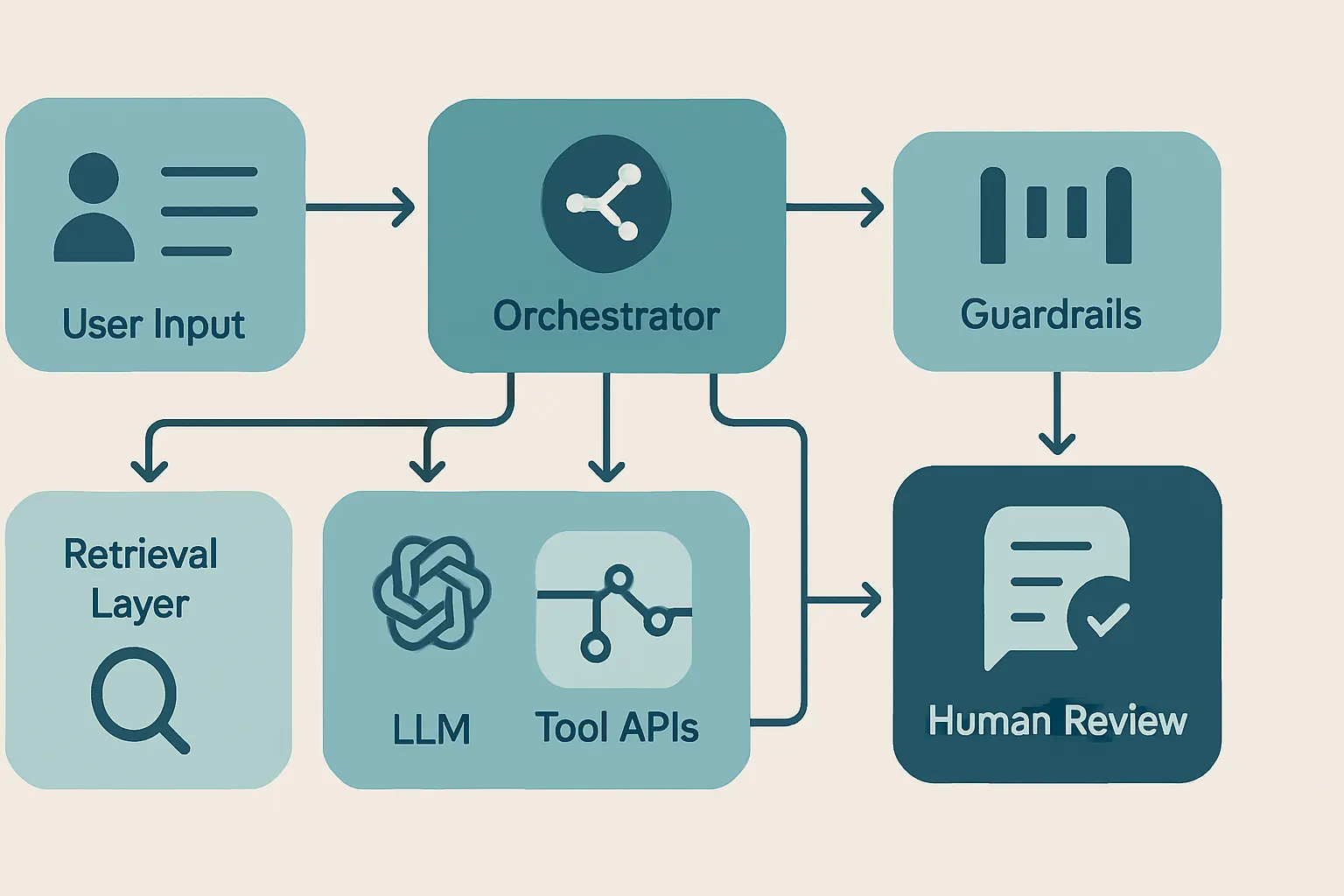
If you need domain-specific behavior, custom evals, or tighter control over model behavior, that’s usually the moment to look at tailored pipelines or custom models, not a bigger prompt stuffed with desperate instructions.
And if your use case needs local inference, privacy guarantees, or sub-second interaction on constrained hardware, that’s a different beast entirely. We’ve done that in on-device AI and voice AI, and the engineering tradeoffs are brutally different from cloud-only chat agents.
But that’s only half the problem.
Cost and Latency Will Humble You Fast
Everybody wants a smart agent. Nobody wants a slow, expensive one.
A user will forgive one mediocre answer if the workflow saves them time. They won’t forgive waiting 14 seconds for an answer that triggers three unnecessary tool calls and costs you enough to make finance start asking questions.
OpenAI notes that token usage directly drives cost in API-based systems, and longer context windows can materially increase spend (Source: OpenAI API Pricing). Anthropic similarly prices by input and output tokens, which means sloppy prompts and oversized context aren’t just ugly — they’re expensive (Source: Anthropic Pricing).
Our opinion: most MVPs should optimize for “fast enough and reliable enough” before chasing marginal quality gains from giant prompts and massive context windows.
That means:
- Keep prompts short and modular
- Retrieve less, but better
- Limit tool hops
- Cache what you can
- Use smaller models where they’re good enough
- Reserve expensive models for fallback or hard cases
If you want a quick sanity check before your bill turns into a horror movie, use something like our AI cost estimator.
Human-in-the-Loop Isn’t a Cop-Out
Some founders hear “human review” and think failure.
We think it’s maturity.
If the action is customer-facing, money-moving, compliance-sensitive, or hard to reverse, put a human checkpoint in the MVP. That doesn’t make the system less useful. It makes it deployable. The goal isn’t “full autonomy” on week one. The goal is reducing human effort without increasing risk.
A good first version might draft replies instead of sending them, prepare actions instead of executing them, or route with confidence labels instead of pretending certainty. That’s still real value.
Honestly, a lot of “autonomous agents” should’ve just been approval workflows with better UX.
The MVP Scorecard We Use Before Shipping
Before an agent touches production traffic, we want clear answers to a few questions:
Is the task narrow enough?
If the workflow can’t be explained simply, it’s too broad.
Is success measurable?
Use concrete metrics: resolution time, completion rate, human edit rate, escalation rate, or task accuracy on a test set.
Can the agent fail safely?
If the model is wrong, what happens? Bad draft? Fine. Wrong refund? Not fine.
Do we have evals based on real tasks?
Benchmarks are nice for Twitter. We care about your actual workflow, your actual documents, and your actual edge cases.
Can we inspect every step?
If a failure happens, can you trace it from user input through retrieval, tool use, output, and final action?
That’s the bar.
If you need help getting there, this is exactly the kind of work we do in AI agents and AI consulting. Not the fluffy “AI strategy” kind. The “why did this tool call nuke the workflow and how do we stop it” kind.
A Quick Word on Voice Agents
Voice makes everything harder.
Latency matters more, interruptions matter more, turn-taking matters more, and users are much less forgiving when the system sounds confident and wrong. We learned that building RunHotel, where on-device voice interactions have to feel natural, fast, and reliable in a real hospitality environment — not just in a quiet demo room.
If your MVP is voice-based, cut scope even harder than you think you should. Spoken interactions amplify every weakness in your orchestration.
FAQ
What’s the fastest way to start ai agent development?
Start with one workflow that already has a human playbook. If a person can do the task by following a repeatable pattern, an agent MVP has a fighting chance.
Do I need RAG for an agent MVP?
No, not always. If the task depends on stable instructions and a small amount of structured context, retrieval may add complexity without enough upside.
Should my MVP be autonomous from day one?
Usually not. Human-in-the-loop is often the right first production design, especially for high-risk actions or messy workflows.
What model should I choose?
Choose the cheapest model that reliably passes your task evals. Model selection without workflow evals is mostly expensive guessing.
When should I use a custom model instead of prompting?
Use a custom model when you need tighter behavior, repeated domain-specific performance, or lower cost at scale. If prompt hacks are piling up like duct tape, that’s your sign.
Build the Boring Version First
The best agent MVPs aren’t magical. They’re disciplined.
They do one thing well, use tools carefully, ask for help when uncertain, and produce logs that make failures obvious instead of mysterious. That’s what works in production. Not agent theater. Not prompt acrobatics. Not a 19-tool orchestration graph that looks like a subway map drawn by a sleep-deprived consultant.
If you’re planning an MVP, start narrower than feels comfortable. Then narrow it again.
If you want a second set of eyes on the architecture, the eval plan, or the cost model, talk to us at Cropsly. We’ll help you build something that survives Monday.