


We Bolted an AI Agent Onto a Broken Workflow. It Got Faster at Doing the Wrong Thing.
Hitesh Sondhi · April 10, 2026 · 13 min read
A lot of companies are making the same mistake right now: they take a messy human workflow, slap an AI agent on top, and call it innovation.
We’ve seen this movie before. The agent replies faster, escalates less, and creates prettier logs — while the actual business outcome barely moves. It’s like putting a turbocharger on a shopping cart. Technically impressive. Operationally stupid.
That’s why enabling agent-first process redesign matters more than picking the “best” model.
Because the model usually isn’t the problem.
Key Takeaways
- If you automate a bad workflow, you just get bad results at machine speed.
- AI agents work best when you redesign decisions, handoffs, and exceptions — not just tasks.
- The right unit of redesign isn’t “what can AI do?” but “where does work stall, branch, and loop?”
- Most teams should start with semi-autonomous agents, not full autonomy. Full autonomy is overrated.
- Measurement has to shift from productivity theater to business outcomes: cycle time, resolution quality, escalation rate, and cost per completed job.
Why “Add an Agent” Is Usually the Wrong Starting Point
Most workflows were designed for humans with inboxes, spreadsheets, tribal knowledge, and a heroic tolerance for nonsense.
That matters.
When you drop an agent into that environment without redesigning the process, the agent inherits all the dysfunction: duplicate approvals, vague ownership, hidden rules, and exceptions that live only in Karen’s head from finance.
We’ve found that teams often overestimate how much of their process is “standard.” Once you actually map the work, you discover the ugly truth: the happy path is tiny, and the business runs on exceptions.
That’s where it gets weird.
A human can survive ambiguity with intuition and context. An agent can’t — at least not reliably enough for production. If the workflow depends on unwritten judgment, the agent will either freeze, hallucinate a policy, or confidently do something dumb.
Hot take: most “AI readiness” conversations are just workflow denial with nicer slides.
What Agent-First Actually Means
Agent-first doesn’t mean “replace people.”
It means you redesign work around a new division of labor: agents handle structured reasoning, retrieval, coordination, and repetitive decisions; humans handle goal setting, edge-case judgment, policy, and accountability.
Think of it like moving from a restaurant where every cook improvises every dish to a kitchen with stations, prep systems, and clear tickets. You’re not removing chefs. You’re removing chaos.
That’s the heart of enabling agent-first process redesign: not asking “where can we use AI?” but asking “if an agent were a reliable digital operator, how would we redesign this process from scratch?”
Here’s a simple way to think about it:
- Don’t start with tasks
- Start with outcomes
- Then map decisions
- Then define what context each decision needs
- Then decide who — human or agent — should own it
That order matters. Get it backward and you’ll build a very expensive autocomplete system.
Here’s how the redesign logic usually flows:
flowchart TD
  A[Business outcome] --> B[Map current workflow]
  B --> C[Identify decisions and handoffs]
  C --> D[Classify by risk and ambiguity]
  D --> E[Assign human vs agent ownership]
  E --> F[Redesign systems, approvals, and context]
  F --> G[Measure outcome, cost, and failure rate]
The real surprise comes after this step: once you map decisions instead of tasks, a lot of “automation opportunities” disappear — and better ones show up.
The Unit of Work Isn’t the Task. It’s the Decision.
This is where a lot of articles get fluffy, so let’s be blunt.
A workflow is not just a sequence of tasks. It’s a chain of decisions, inputs, constraints, and exceptions. If you only automate the visible task — “reply to customer,” “summarize ticket,” “update ERP” — you miss the real bottleneck.
The bottleneck is usually one of these:
- missing context
- unclear approval rules
- too many handoffs
- poor system access
- exceptions with no owner
We’ve seen teams automate ticket drafting while the real delay was waiting six hours for someone to decide whether the issue qualified for refund policy B versus goodwill exception C. The draft wasn’t the problem. The decision was.
That’s why enabling agent-first process redesign means decomposing work into decision points.
Not every decision should be agent-owned, obviously. A pricing exception for a strategic customer? Human. Categorizing a standard invoice dispute using policy rules and CRM history? Agent, with confidence thresholds and audit logs.
If you don’t do this decomposition, you’ll end up with agents that look busy and deliver very little.
Stop Worshipping Full Autonomy
We’re going to say the quiet part out loud: full autonomy is wildly overrated for most businesses.
It sounds great in demos. In production, it’s often a compliance incident waiting for a timestamp.
Most organizations should start with three modes:
1. Agent as analyst
The agent gathers context, summarizes cases, recommends next actions, and prepares outputs.
This is the safest starting point because humans still approve decisions, but the slow, annoying prep work disappears.
2. Agent as operator
The agent executes well-defined actions inside guardrails: update records, route requests, trigger refunds under a threshold, schedule callbacks, draft vendor emails.
This is where ROI usually starts to show up.
3. Agent as orchestrator
The agent coordinates across systems and sub-agents, manages state, and handles multi-step workflows with escalation logic.
This is powerful, but only after the first two are stable. Jumping straight here is like trying to learn drifting before you can park.
We’ve built enough production AI systems to know this pattern holds. Even in voice AI flows, where responsiveness matters a lot, the “fully autonomous” version often needs more operational babysitting than anyone admits. That’s one reason products like RunHotel work when the task boundaries are clear: guest intent, property policy, permitted actions, escalation path. Tight scope beats magical thinking every time.
Where to Redesign First
If you’re serious about enabling agent-first process redesign, don’t start with the most visible workflow.
Start with the most broken one that still has repeatable structure.
That usually means workflows with:
- high volume
- clear inputs and outputs
- painful handoffs
- repeatable policies
- measurable cost of delay
- lots of swivel-chair work across systems
Good candidates:
- customer support triage and resolution routing
- claims intake
- lead qualification
- vendor onboarding
- appointment coordination
- internal IT support
- collections follow-up
- compliance document review
Bad candidates, at least early on:
- highly political approval chains
- strategy-heavy planning work
- anything with fuzzy success criteria
- processes where nobody agrees on the rules
If your process changes based on who shouts loudest in Slack, the issue isn’t AI. It’s governance.
Here’s a useful visual for what to target first:
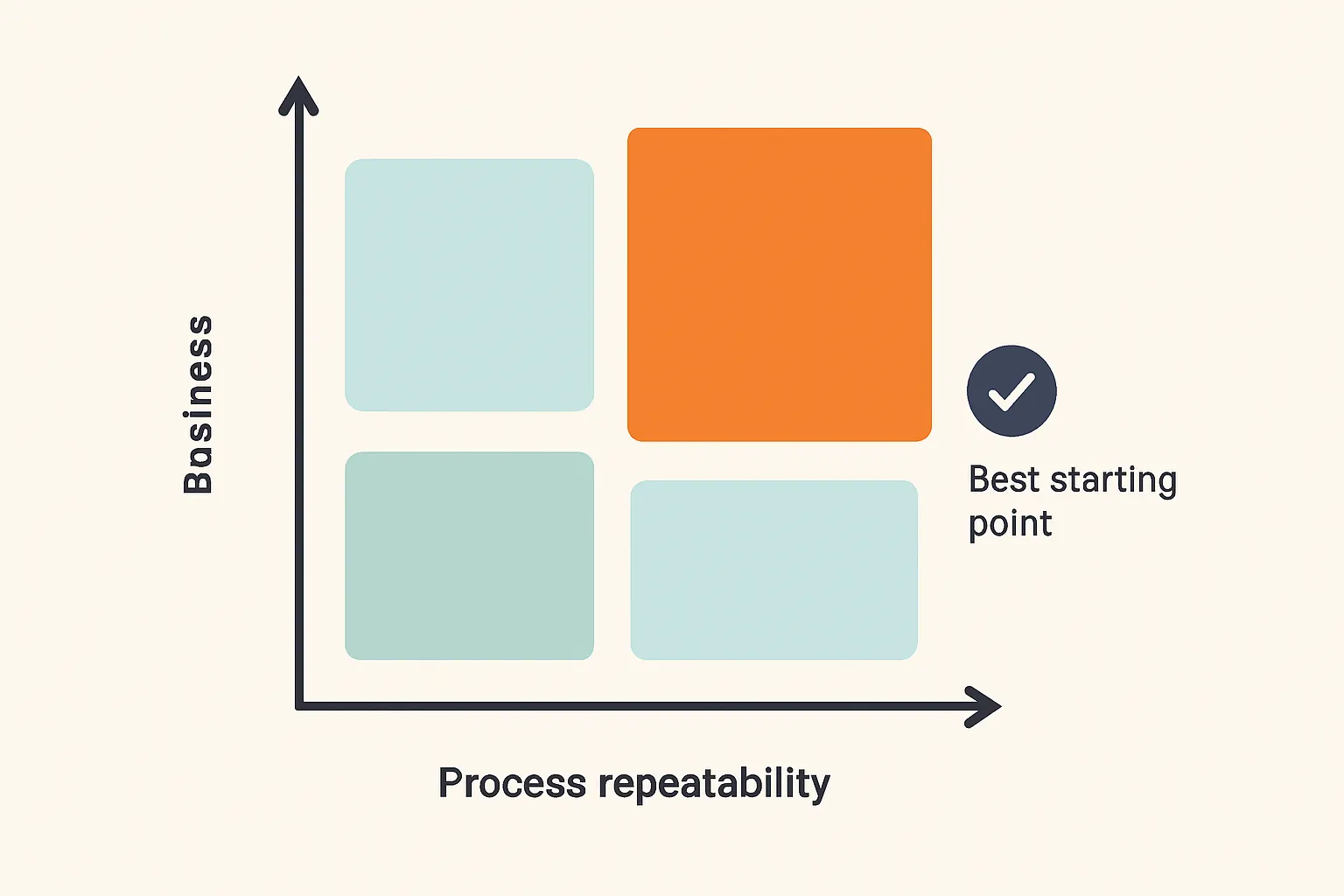
And no, “our executives want an AI assistant” is not a workflow strategy.
The Five Redesign Moves That Actually Matter
Most agent-first articles stop at principles. Nice for conference panels. Useless on Monday morning.
Here are the redesign moves we think actually matter.
1. Collapse handoffs aggressively
Every handoff is latency, context loss, and blame distribution masquerading as process.
If a workflow bounces from sales ops to finance to legal to support just to answer a standard customer request, that’s not rigor. That’s bureaucracy cosplay.
Agents are good at carrying context across steps. Use that. Redesign the workflow so one agent-owned thread can gather data, apply rules, and only escalate when confidence or policy demands it.
2. Turn tribal knowledge into explicit operating context
This is the unsexy part, which is exactly why companies skip it.
Agents need structured access to policies, thresholds, examples, exceptions, and system permissions. If your best operator says “I just know when this case looks suspicious,” you don’t have a process. You have a dependency.
This is where custom models, retrieval layers, and policy tooling can matter — not because every company needs a fine-tuned model, but because some domains need tighter behavior than generic prompting can provide.
Fine-tuning without process clarity is like seasoning food before you know what dish you’re cooking.
3. Design escalation before autonomy
We’ve seen teams spend weeks on prompts and almost no time on fallback logic.
Bad idea.
A production agent needs explicit rules for when to stop, ask, defer, or hand off. Confidence thresholds, policy exceptions, missing data, conflicting records, unhappy customer sentiment — these aren’t edge concerns. They are the job.
4. Redesign metrics around completed outcomes
If your dashboard celebrates “agent handled 82% of conversations” but CSAT dropped and refund leakage increased, congratulations, you built a KPI costume.
Measure things like:
- time to resolution
- first-contact resolution
- cost per completed case
- escalation rate
- rework rate
- policy compliance
- customer outcome quality
For cost modeling, we often tell teams to do the boring math early. A rough estimate with a tool like our AI cost estimator is better than discovering six weeks later that your “cheap” agent burns tokens like a bonfire.
5. Rebuild interfaces for agents, not just humans
This one gets ignored constantly.
A lot of enterprise software assumes a patient human clicking through tabs. Agents need APIs, structured fields, deterministic actions, and permission boundaries. If your system only works through brittle UI automation, you’re building on wet cardboard.
That’s why workflow redesign often turns into systems redesign. Sometimes a small backend change creates more agent value than any prompt engineering sprint. We do a lot of this kind of plumbing in broader AI consulting and implementation work, because the flashy part fails without the boring part.
But that’s only half the problem.
Your Process Needs an “Agent Contract”
One of the cleanest ways to operationalize this is to define an agent contract for each workflow.
Not legal contract. Operating contract.
For every agent-involved process, write down:
- goal
- allowed actions
- required context
- systems it can access
- decision thresholds
- escalation triggers
- audit requirements
- success metrics
This sounds obvious. It isn’t. Most teams skip it because they’re in a hurry, and then they wonder why the agent behaves like an overconfident intern on day one.
Here’s a simple version of that operating model:
flowchart LR
  A[User or system request] --> B[Agent reads context]
  B --> C{Within policy and confidence?}
  C -->|Yes| D[Agent executes action]
  C -->|No| E[Escalate to human]
  D --> F[Log decision and outcome]
  E --> F
If you can’t define this contract, you’re not ready for autonomy in that workflow.
You might still be ready for assistance. That’s different, and that’s fine.
The Maturity Model Nobody Likes Because It Requires Patience
Everybody wants stage five.
Nobody wants stage two.
In practice, agent maturity usually looks like this:
Stage 1: Visibility
You map the workflow, identify decision points, and instrument the process.
No magic yet. Just honesty.
Stage 2: Assistance
Agents summarize, retrieve, classify, and recommend.
This stage is underrated because it’s not sexy. It’s also where a lot of value shows up with low operational risk.
Stage 3: Bounded execution
Agents can take approved actions in narrow, policy-controlled scenarios.
This is where you start trusting the system because it earns trust instead of demanding it.
Stage 4: Multi-step orchestration
Agents coordinate across systems, manage state, and handle common exceptions.
Now you’re getting real leverage.
Stage 5: Adaptive autonomy
Agents improve routing, decision quality, and workflow optimization based on feedback and outcomes.
Very few teams are actually here, and that’s okay. Pretending you are is how disasters happen.
Our hot take: if you haven’t nailed stage 2 and 3, talking about “autonomous enterprises” is mostly branding.
What This Looks Like in the Real World
Take a support operation.
The old workflow: ticket arrives, human reads it, hunts through CRM, checks policy docs, asks another team for account history, drafts a reply, waits for approval on edge cases, updates three systems, and maybe forgets one because they’re human and it’s 5:47 PM.
The agent-first workflow: the agent ingests the ticket, pulls CRM and billing context, classifies intent, checks policy, proposes or executes the allowed action, updates systems, and escalates only when confidence is low or policy boundaries are hit.
Same business goal. Completely different operating model.
We’ve seen similar patterns in voice systems too. In voice AI, the temptation is to make the assistant sound smart. The better move is to make the workflow unambiguous: what can it do, what data can it access, when should it hand off, and how fast can it recover from uncertainty. Voice just makes bad workflow design fail out loud.
And if you’re dealing with constrained environments, like local execution or privacy-heavy deployments, on-device AI changes some architecture choices but not the redesign principle. Local models don’t rescue a broken process. They just break privately and with lower latency.
FAQ
What is agent-first process redesign?
It’s redesigning workflows around what AI agents can reliably own, not just inserting AI into old human processes. The focus shifts to decisions, context, guardrails, and escalation paths.
How is agent-first different from simple automation?
Simple automation follows fixed rules in fixed paths. Agent-first workflows can reason across context, handle variation, and coordinate steps — but only if the process is redesigned to support that.
Where should a company start with enabling agent-first process redesign?
Start with a high-volume workflow that has repeatable rules, painful handoffs, and measurable business impact. Support triage, claims intake, and vendor onboarding are usually better starting points than strategy or complex approvals.
Do we need custom models for AI agents?
Not always. Many workflows work fine with strong prompting, retrieval, and guardrails, but regulated or domain-heavy processes may benefit from custom models when generic behavior isn’t consistent enough.
Should AI agents be fully autonomous?
Usually not at first. Most teams get better results from semi-autonomous systems that assist or operate within narrow policy boundaries before moving toward broader orchestration.
So What Should You Do Next?
Pick one workflow.
Not ten. One.
Map the current process, identify the real decisions, define the agent contract, and decide where human judgment actually matters. If you want help doing that without wasting a quarter on demo theater, talk to us about AI agents or reach out through our contact page.
Because the companies that win with AI agents won’t be the ones with the flashiest demos.
They’ll be the ones disciplined enough to redesign the work.