


Different Ways to Debug Android API Calls
Shivam Kapoor · March 21, 2024 · 4 min read
While developing Android apps many developers face the question “How to debug outgoing and incoming traffic on Android?”. QA Engineers during testing Android Apps also need a way using which they can see all the logs related to the API’s calls so that they can check what data is being sent from the app and whether the data sent is valid or not.
API monitoring helps developers as well as QA Engineers to gain a better understanding of how their application communicates with the server, which helps in troubleshooting and enhances user experience. In this article, the following sections will cover popular tools and techniques that can help you effectively track API calls, analyze the data you gather, and improve your Android Application.
So let's first explore some of the latest free options available, and then we will cover some paid options as well.
Android Studio
Monitoring the application's API calls may also be done using Android Studio's Network Inspector. No other tools or libraries are required; all is done through Android Studio.
To open the Network Inspector in Studio, follow these steps:
- To inspect an app, click View -> Tool Windows -> App Inspection from the Android Studio navigation bar. Choose Network Inspector from the tabs when the app inspection window automatically establishes a connection with an app process. You might have to choose an app process manually if the app inspection window is unable to connect to one automatically.
- The App Inspection window allows you to select the device and app process that you wish to analyze.
The below window will open if everything is working fine
Flipper by Facebook:
Flipper is a library from Facebook a desktop debugging platform for mobile developers. It provides many more features and debugging tools besides monitoring API calls, such as the ability to view Shared Preferences, Check the XML layout, See Databases within the app, and more. Let's see how we can use this to monitor API calls.
Steps to add Flipper
Open build.gradle file and add the following
dependencies {
  val flipper_version = "0.250.0"
  debugImplementation("com.facebook.flipper:flipper:$flipper_version")
  debugImplementation("com.facebook.soloader:soloader:0.10.5")
  debugImplementation("com.facebook.flipper:flipper-network-plugin:$flipper_version")

  releaseImplementation("com.facebook.flipper:flipper-noop:$flipper_version")
}
To start using Flipper, initialize it and add which plugin/features of Flipper you are interested in.
override fun onCreate() {
  super.onCreate()
  AndroidFlipperClient.getInstance(this@App).apply {
      addPlugin(FlipperModule.networkFlipperPlugin)
      start()
  }
}
Now let's add a flipper interceptor to an instance of OkHttpClient:
val okHttpClient = OkHttpClient.Builder()
      .addInterceptor(FlipperOkhttpInterceptor(NetworkFlipperPlugin())
      .build()
That is it! Now go to https://fbflipper.com/ and download a Flipper client that is compatible with our system. Once downloaded, we must configure it and assist it in determining where adb is located on our system. After that, if we launch the app on an emulator or a device, we will see the following in the Flipper client:
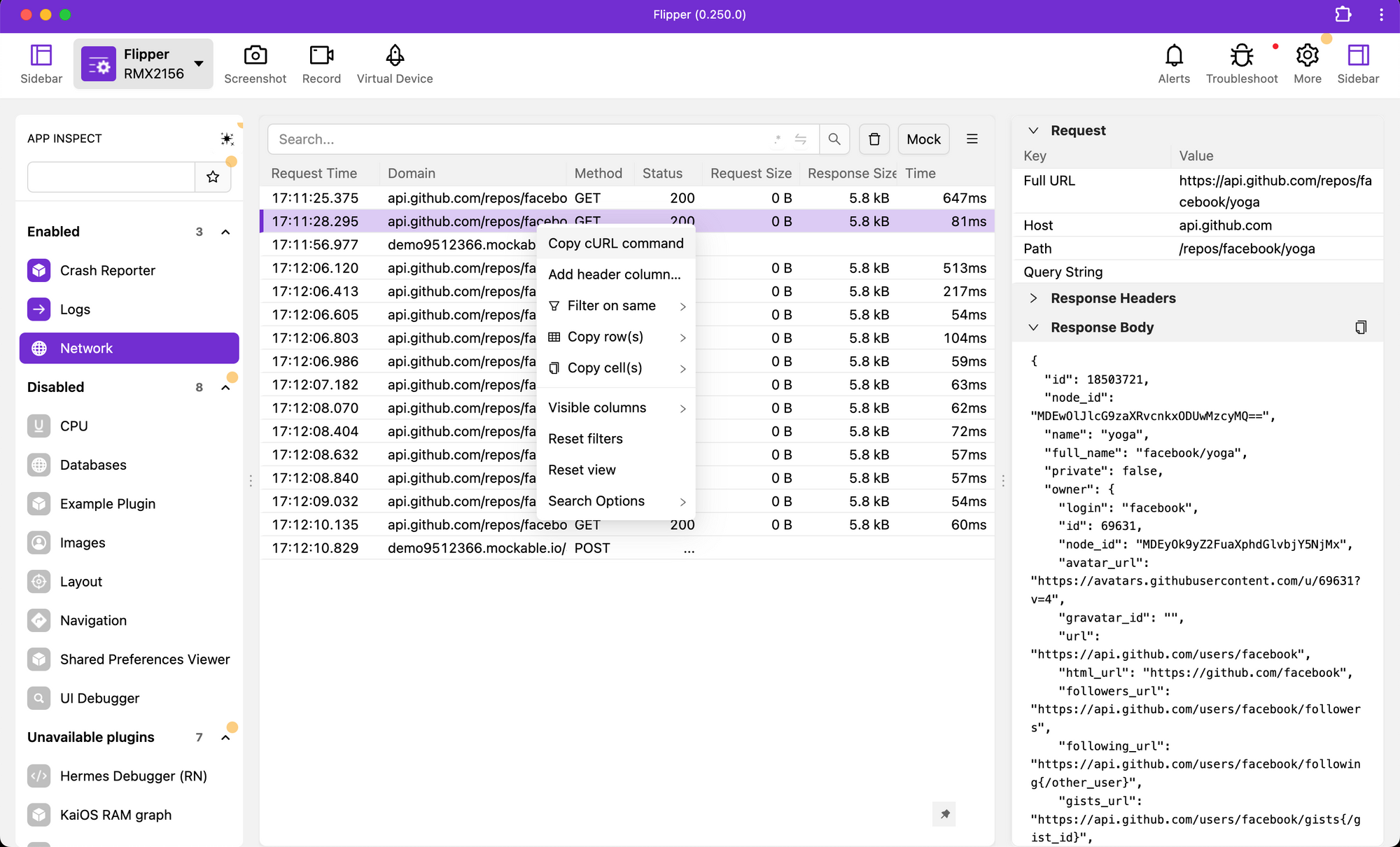
using this we can:
- Inspect all properties of a request and response
- Share cURL command with the QA Engineer or API team
- Add different filters
- Inspect layout and many more things
And much more!
Now let's discuss in brief about the paid options available ?
- AppSpector — Uncover & Resolve App Issues Instantly
- Shipbook — Find What You are Logging For.
- Bugfender — Remote Logger, Crash Reporter and In-App User Feedback
Conclusion:
We’ve discussed the following:
- Android Studio
- ADB Logcat
- Chucker
- Flipper
Each of them has some pros & cons and based on the requirements and your needs anyone can be used. Chucker is a good solution, in my opinion, since it gives everyone on the team, from QA to managers a very simple tool to use for inspecting API calls when necessary. Flipper contains rich information and can be used for more than just network inspection, so perhaps it would be a suitable choice for developers.
The Network Inspection feature in Android Studio might be a useful choice for rapid debugging if we don't have time to set anything up.
Happy Debugging ?